ViewSonic VG2456 24-inch Full HD USB-C Docking Monitor
Brian Long
Product Introduction
The ViewSonic VG2456 is a 24-inch Full HD IPS docking monitor designed to simplify business workstations with integrated USB-C, Ethernet, USB peripheral connectivity, and multi-monitor support. Its 1920 x 1080 IPS display provides wide viewing angles and consistent image quality, while a three-sided thin-bezel design is well suited to productive multi-display configurations.
A single USB-C connection carries video, audio, and data while supplying up to 60W of charging power to compatible laptops. Built-in gigabit Ethernet provides wired network connectivity, while DisplayPort output enables MST daisy chaining for streamlined dual- and multi-monitor installations. The VG2456 also features comprehensive ergonomic adjustment, integrated speakers, a quick-release stand, and ViewSonic vDisplayManager support for flexible professional workspaces.
Product Gallery


Product Details
Key Features
-
24-inch Full HD IPS Display: A 23.8-inch viewable IPS panel with 1920 x 1080 resolution delivers consistent image quality and wide 178° viewing angles for everyday business applications.
-
Single-Cable USB-C Docking: Connect a compatible laptop through USB-C for video, audio, data, and charging over a single cable.
-
60W USB-C Power Delivery: Supplies up to 60W of charging power to compatible laptops and devices, reducing the need for a separate power adapter at the workstation.
-
Integrated Gigabit Ethernet: Built-in RJ45 connectivity provides fast and reliable wired networking through the monitor’s docking environment.
-
DisplayPort MST Daisy Chaining: DisplayPort output allows compatible monitors to be connected in a multi-display chain, simplifying cabling for productive multi-monitor workstations.
-
Flexible Multi-Monitor Deployment: DisplayPort 1.2 MST supports daisy-chain configurations from compatible DisplayPort or USB-C source devices. The number of supported displays depends on the host graphics hardware and configuration.
-
Integrated USB Hub:
- 2x USB Type-A downstream ports
- 1x USB Type-B upstream port
- 1x USB Type-C connection
- Convenient connectivity for keyboards, mice, storage devices, and other desktop peripherals
-
Flexible Display Connectivity:
- 1x USB Type-C
- 1x HDMI 1.4
- 1x DisplayPort input
- 1x DisplayPort output
- Supports a wide range of business desktops and laptops
-
Three-Sided Thin-Bezel Design: Narrow bezels help create a more seamless viewing experience when multiple VG2456 monitors are positioned side by side.
-
SuperClear IPS Technology: Wide viewing angles help maintain consistent color and brightness when viewing the display from different positions.
-
Fully Ergonomic Stand:
- 130 mm (5.1") height adjustment
- 120° total swivel range
- 90° clockwise and counterclockwise pivot
- -5° to 40° tilt
- Landscape and portrait configurations
-
40-Degree Backward Tilt: The extended tilt range makes the monitor easier to position for collaborative viewing, discussions, and screen sharing.
-
Quick-Release Stand: An easy-to-install stand helps simplify monitor deployment and removal in business environments.
-
Integrated Carrying Handle: The stand incorporates a carrying handle to help simplify setup and workstation deployment.
-
Client Mount Support: The stand design supports compatible client devices for cleaner workstation installations.
-
Enhanced Viewing Comfort: Flicker-Free technology and a Blue Light Filter help support comfortable viewing during extended work sessions.
-
ViewSonic ViewMode: Preset viewing modes optimize display characteristics for different applications including text, web, movie, and other content.
-
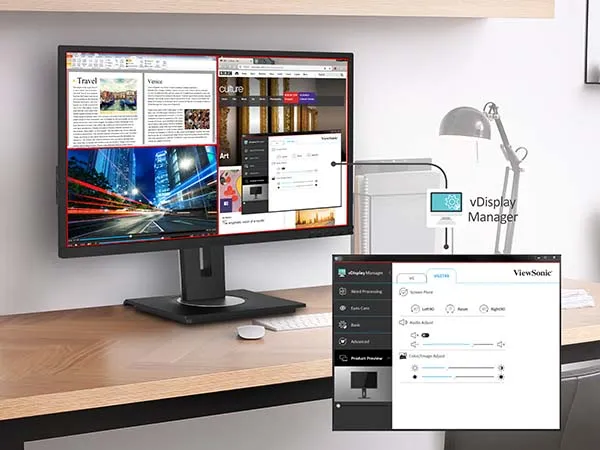
ViewSonic vDisplayManager Support: Compatible ViewSonic software provides convenient on-screen access to monitor controls and screen-layout tools for multitasking.
-
Integrated Audio: Dual 2W speakers provide built-in sound for conferencing, presentations, notifications, and everyday desktop audio.
-
VESA Mount Compatible: Standard 100 x 100 mm VESA mounting enables installation with compatible monitor arms, wall mounts, and multi-display mounting systems.
-
ENERGY STAR and EPEAT Certified: Environmental and energy-efficiency certifications help support more sustainable business technology deployments.
-
Three-Year Limited Warranty: Backed by ViewSonic’s three-year limited warranty on parts, labor, and backlight, subject to ViewSonic warranty terms and conditions.
Specifications
| Category | Specification | VG2456 |
|---|---|---|
| Display | Screen Size | 24" |
| Viewable Area | 23.8" | |
| Panel Type | IPS | |
| Resolution | 1920 x 1080 Full HD | |
| Aspect Ratio | 16:9 | |
| Refresh Rate | 60Hz | |
| Brightness | 250 cd/m² | |
| Static Contrast Ratio | 1,000:1 | |
| Dynamic Contrast Ratio | 50,000,000:1 | |
| Colors | 16.7 million | |
| Response Time | 15ms typical GTG | |
| Response Time with Overdrive | 5ms GTG | |
| Viewing Angles | 178° horizontal / 178° vertical | |
| Backlight | WLED | |
| Backlight Life | 30,000 hours | |
| Panel Surface | Anti-glare, 3H hard coating | |
| Resolution Support | Maximum PC Resolution | 1920 x 1080 |
| Maximum Mac Resolution | 1920 x 1080 | |
| Connectivity | USB-C | 1x USB 3.2 Type-C with up to 60W power delivery |
| USB-A | 2x USB Type-A downstream | |
| USB-B | 1x USB Type-B upstream | |
| HDMI | 1x HDMI 1.4 | |
| DisplayPort Input | 1x DisplayPort 1.2 | |
| DisplayPort Output | 1x, MST daisy-chain support | |
| Ethernet | 1x Gigabit Ethernet RJ45 | |
| Audio | Internal Speakers | 2W x 2 |
| Daisy Chain | Technology | DisplayPort 1.2 Multi-Stream Transport (MST) |
| Source Support | DisplayPort or compatible USB-C video source | |
| Maximum Resolution per Display | 1920 x 1080 | |
| Maximum Monitors | Up to 4, dependent on graphics hardware and configuration | |
| Ergonomics | Height Adjustment | 130 mm / 5.1" |
| Tilt | -5° to 40° | |
| Swivel | 120° total | |
| Pivot | 90° right / 90° left | |
| Mounting & Security | VESA Mount | 100 x 100 mm |
| Kensington Lock Slot | Yes | |
| Video Signal | Horizontal Frequency | 15–82 kHz |
| Vertical Frequency | 24–75 Hz | |
| HDMI Sync | TMDS, HDMI 1.4 | |
| DisplayPort | DisplayPort 1.2 | |
| USB-C Video | DisplayPort Alt Mode | |
| Power | Voltage | AC 100–240V, 50–60Hz |
| Power Supply | Internal | |
| Typical Consumption | 13.7W | |
| Maximum Consumption | 17.4W | |
| Eco Mode - Optimized | 11.7W | |
| Eco Mode - Conserve | 10.0W | |
| Standby | 0.3W | |
| Operating Conditions | Temperature | 32–104°F / 0–40°C |
| Humidity | 20–90%, non-condensing | |
| Dimensions | With Stand | 21.2" W x 16.0" H x 8.0" D |
| Without Stand | 21.2" W x 12.6" H x 2.0" D | |
| With Stand (Metric) | 539.0 W x 406.2 H x 202.0 D mm | |
| Without Stand (Metric) | 539.0 W x 320.0 H x 52.0 D mm | |
| Packaging | 23.4" W x 8.3" H x 15.6" D | |
| Packaging (Metric) | 595.0 W x 210.0 H x 396.0 D mm | |
| Weight | Net With Stand | 14.1 lb / 6.4 kg |
| Net Without Stand | 8.8 lb / 4.0 kg | |
| Gross | 20.7 lb / 9.4 kg | |
| Certifications | Regulations | cTUVus, FCC-B, ICES003, ENERGY STAR, EPEAT, MX-CoC, Mexico Energy |
| Warranty | Limited Warranty | 3 years on parts, labor, and backlight |
Included in the Box
- ViewSonic VG2456 display
- Power cable
- DisplayPort-to-DisplayPort cable
- USB Type-C cable
- USB 3.2 uplink cable
- Quick Start Guide
Manuals and Documents
-
ViewSonic VG2456 Product Datasheet - Manufacturer product overview, key features, connectivity information, and technical specifications.
-
ViewSonic VG2456 User Guide - Detailed instructions covering installation, USB-C docking, DisplayPort MST daisy chaining, Ethernet connectivity, monitor configuration, ergonomics, and maintenance.
-
ViewSonic VG2456 Product Page - Current manufacturer product information, specifications, downloads, and support resources.
The ViewSonic VG2456 combines a Full HD IPS display with 60W USB-C docking, gigabit Ethernet, DisplayPort MST daisy chaining, USB peripheral connectivity, and comprehensive ergonomic adjustment. Its integrated docking and DisplayPort output make it particularly well suited for business workstations where streamlined laptop connectivity and multi-monitor deployment are priorities.